

HomeDesignsAI
HomeDesignsAI instantly transforms homes and gardens from a single photo, delivering professional-grade redesigns in under 30 seconds.
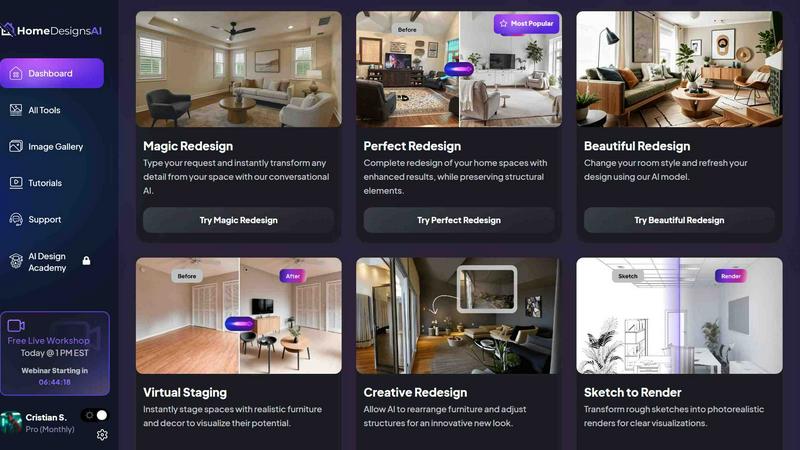
About HomeDesignsAI
HomeDesignsAI is an advanced artificial intelligence platform that revolutionizes home and property design by enabling users to transform interiors, exteriors, and gardens from a single photograph. The tool is designed for homeowners, real estate professionals, interior designers, landscapers, architects, and home builders who need fast, photorealistic redesigns without requiring any prior design expertise. Its core value proposition lies in its speed and accessibility: users upload a photo of any space, select from over 200 design styles and 120 space types, and receive a completely reimagined, high-quality rendering in under 30 seconds. The platform supports a wide range of applications, including virtual staging of empty rooms, texture and color customization, weather changes, and direct shopping links for furniture and decor featured in generated designs. Trusted by over 2.6 million users across 170 countries, HomeDesignsAI has completed more than 7.68 million projects, making it the world's leading AI home design tool. It is fully web-based, requiring no software installation, and offers a scalable API for businesses looking to integrate its capabilities into their own workflows. The tool is particularly valuable for professionals who need to present multiple design options quickly to clients, as well as for homeowners exploring renovation ideas. Its beginner-friendly interface combined with powerful customization options ensures that both novices and experts can achieve stunning results. The platform also includes an adjustable AI intervention level, allowing users to control how much creative freedom the AI has, and a custom instructions feature for precise design guidance. With support for interior, exterior, and landscape design all in one place, HomeDesignsAI eliminates the need for multiple specialized tools, streamlining the entire design process from concept to visualization.
Features of HomeDesignsAI
Extensive Style and Space Library
HomeDesignsAI offers an unparalleled library of over 200 design styles, ranging from Scandinavian and Japandi to Modern Farmhouse, Bohemian, Quiet Luxury, Mediterranean, and Industrial. This is complemented by support for more than 120 space types, including living rooms, bathrooms, outdoor kitchens, hotel lobbies, and Airbnb units. This vast selection ensures that users can find the perfect aesthetic for any project, whether residential or commercial, and explore styles they may not have considered. The ability to mix and match styles with different space types provides limitless creative possibilities, all accessible from a single platform without needing to switch between different tools or templates.
Interior, Exterior, and Garden Redesign
Unlike many design tools that focus on a single area, HomeDesignsAI covers all three major property design domains: interiors, exteriors, and gardens or landscapes. Users can upload a photo of a living room, a house facade, or a backyard and instantly receive a redesigned version in their chosen style. This comprehensive approach is particularly valuable for professionals like landscapers and home builders who need to present cohesive design concepts for entire properties. The AI handles the unique challenges of each domain, such as lighting for interiors, structural elements for exteriors, and plant life for gardens, ensuring realistic and practical results every time.
Fill The Room Auto-Furnishing
The Fill The Room feature is a powerful virtual staging tool that automatically furnishes empty spaces. When a user uploads a photo of a vacant room, the AI intelligently adds furniture, decor, and accessories that match the selected design style. This is ideal for real estate agents and property managers who need to show potential buyers how a space could look when fully furnished. The auto-furnishing is not random; it considers the room's dimensions, lighting, and layout to create a balanced and aesthetically pleasing arrangement. Users can further customize the placement and items, or generate multiple variations to compare different furnishing options.
Texture Swap, Color and Material Customization, and Weather Changes
HomeDesignsAI provides granular control over the final design through its texture swap, color, and material customization tools. Users can change wall colors, flooring materials, countertop textures, and more with just a few clicks. For exterior and garden designs, the platform also supports weather changes, allowing users to see how their property would look in different seasons or lighting conditions, such as sunny, cloudy, or snowy. This level of customization ensures that the generated design aligns perfectly with the user's vision, whether they are matching existing decor or starting from scratch. The adjustable AI intervention level further refines this control, letting users decide how much the AI should alter the original photo.
Use Cases of HomeDesignsAI
Real Estate Virtual Staging
Real estate agents and property listing platforms use HomeDesignsAI to virtually stage empty or outdated properties, making them more appealing to potential buyers. By uploading a photo of a vacant living room or bedroom and selecting a modern or cozy style, agents can generate fully furnished, photorealistic images in under 30 seconds. This significantly reduces the cost and time associated with traditional staging, while allowing multiple design options to be presented for the same property. The generated images can be used in online listings, brochures, and social media marketing to attract more interest and potentially higher offers.
Home Renovation Planning
Homeowners planning renovations use HomeDesignsAI to visualize different design options before committing to construction or purchases. For example, a homeowner considering a kitchen remodel can upload a photo of their current kitchen and experiment with various styles like Modern Farmhouse, Scandinavian, or Industrial. They can change cabinet colors, countertop materials, and backsplash textures, seeing the results instantly. This helps them make informed decisions about materials and layouts, reducing the risk of costly mistakes. The tool also provides shopping links for furniture and decor, making it easy to purchase items that match the final design.
Interior Design Client Presentations
Professional interior designers leverage HomeDesignsAI to quickly generate multiple design concepts for their clients. Instead of spending hours creating mood boards or manual renderings, designers can upload photos of the client's space and produce several style variations in minutes. This accelerates the proposal process and allows clients to see realistic representations of how different aesthetics would look in their actual home. The custom AI instructions feature enables designers to incorporate specific client preferences, such as "use only sustainable materials" or "keep the existing sofa," ensuring the designs are both creative and practical.
Landscape and Garden Design
Landscapers and homeowners use HomeDesignsAI to redesign outdoor spaces, including gardens, patios, terraces, and lawns. By uploading a photo of their current yard, users can explore different landscaping styles, add plants, change hardscaping materials, and even simulate seasonal weather changes. This is particularly useful for planning major garden overhauls or creating outdoor living areas. The tool's ability to handle natural elements like trees, grass, and water features ensures that the generated designs are realistic and achievable. Professionals can present these visualizations to clients to secure approval for landscaping projects.
Frequently Asked Questions
What types of photos can I upload to HomeDesignsAI?
You can upload photos of any interior space, exterior facade, or garden or landscape area. The tool works best with clear, well-lit images that show the full space you want to redesign. Supported file formats include JPEG, PNG, and other standard image types. The AI is trained to recognize room layouts, architectural features, and outdoor elements, so even complex spaces with multiple angles or unique shapes can be processed effectively. For best results, ensure the photo is taken from a straight-on perspective and includes as much of the room or area as possible.
How long does it take to generate a design?
HomeDesignsAI generates photorealistic redesigns in under 30 seconds. The exact time depends on the complexity of the image and the selected style, but most designs are completed within this timeframe. This speed is made possible by the platform's optimized AI models and cloud-based infrastructure. Users can upload a photo, choose their preferences, and receive the result almost instantly, making it practical for real-time client presentations or rapid iteration during the design process. The tool also supports batch processing for users who need to redesign multiple spaces at once.
Can I use HomeDesignsAI for commercial projects?
Yes, HomeDesignsAI is trusted by over 70,000 professional users, including real estate agents, interior designers, landscapers, home builders, and architects. The platform offers a scalable API for businesses that want to integrate its design capabilities into their own applications or workflows. Commercial users benefit from the same speed and quality as individual users, with additional features like custom AI instructions, adjustable intervention levels, and furniture shopping links. The tool is designed to handle high-volume usage, making it suitable for property listing platforms, design firms, and construction companies.
Is any design skill required to use HomeDesignsAI?
No, HomeDesignsAI is specifically designed to be beginner-friendly and requires zero design skills. The entire process is guided by a simple three-step workflow: upload a photo, set your preferences by selecting a style and any custom instructions, and generate the result. The AI handles all the complex design decisions, from color coordination to furniture placement. Advanced users can still take advantage of customization options like texture swapping and material changes for more control. The platform includes tutorials and a responsive support team to help new users get started quickly.
Similar to HomeDesignsAI

RoofReport
RoofReport is a free AI tool that lets you instantly visualize any shingle color on your own house with no signup required.

archmaster
Archmaster uses AI to turn photos of rooms or buildings into photorealistic interior and exterior designs in seconds with 20 style presets.