

Prompt Builder
Prompt Builder instantly creates, refines, and manages AI prompts for models like ChatGPT and Gemini in one workspace.
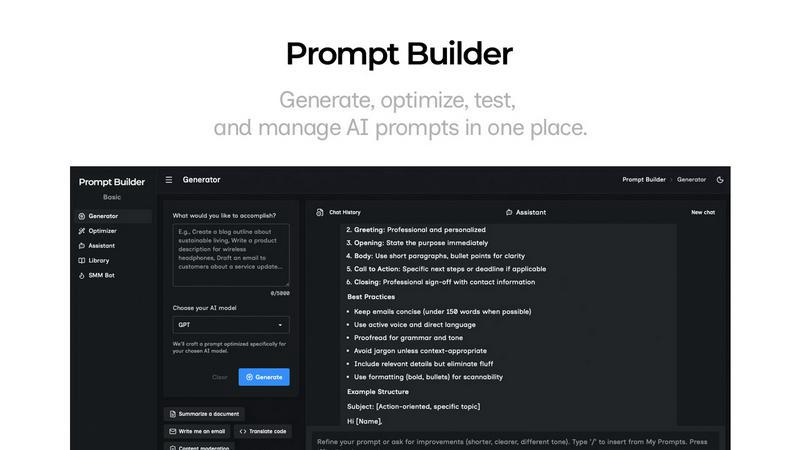
About Prompt Builder
Prompt Builder is a comprehensive prompt engineering workspace designed to streamline the entire process of creating, testing, and managing AI prompts. It serves as a central hub for professionals, content creators, developers, and anyone who regularly uses large language models (LLMs) to get consistent, high-quality outputs. The core value proposition is eliminating the inefficiency of manually rewriting and testing prompts across different AI models. Instead of spending hours crafting and recrafting instructions, users describe their task in plain English, select their target AI model, and Prompt Builder generates a professionally structured, model-optimized draft in seconds. This prompt can then be refined in a built-in chat interface, saved with version history, and executed directly within the platform. It supports a wide array of models including GPT, Claude, Gemini, Llama, Mistral, and more, making it a universal tool for modern AI workflows. By providing tools for generation, optimization, testing, and library management, Prompt Builder turns a simple idea into a reusable, effective prompt, ensuring users spend less time on prompt engineering and more time on actionable results.
Features of Prompt Builder
Prompt Generator
The Prompt Generator is the starting point for any project. You simply describe your task or idea in natural language and select the AI model you intend to use, such as Gemini, Claude, or GPT. The tool then crafts a detailed, model-tailored prompt that includes appropriate structure, constraints, and output formatting. This provides a solid, professional-grade first draft that you can immediately refine within the integrated chat workspace, significantly cutting down initial setup time from minutes or hours to mere seconds.
Prompt Assistant
The Prompt Assistant is a built-in chat workspace that allows you to test and iterate on your prompts without ever leaving the application. You can run your generated or optimized prompts directly, select from different assistant models (like Grok or DeepSeek) for testing, and have full conversation threads to refine outputs through follow-ups. This keeps all your testing organized in one place, preventing the loss of effective prompt versions across disparate chat interfaces and enabling fast, efficient iterations.
Prompt Optimizer
The Prompt Optimizer enhances existing prompts. You can paste any prompt—whether from an external source or your saved Library—and the tool will analyze and improve it. It provides structured enhancements for clarity, adds necessary constraints, refines the output format, and can suggest examples. Each optimization is saved in a history log, and you can pin your favorite versions. With one click, you can run the optimized prompt in the Assistant to immediately validate the improvements.
Prompt Library
The Prompt Library is your centralized repository for all prompts. It allows you to save, organize, and tag your best prompt versions, creating a personal knowledge base that grows over time. You can quickly search and filter by category or target model. The library also includes a community section where you can explore and favorite prompts shared by other users, facilitating inspiration and reuse across various projects and use cases.
Use Cases of Prompt Builder
Content Creation and Marketing
Marketing professionals and content creators can use Prompt Builder to generate consistent, on-brand copy, blog outlines, social media posts, and advertising copy across multiple platforms. The SMM Bot feature specifically helps craft platform-ready posts for X, LinkedIn, and Instagram. By saving successful prompt templates for different content types and tones in the Library, teams can maintain quality and voice while drastically speeding up their content production pipeline.
Software Development and Technical Writing
Developers and technical writers can leverage the tool to generate code snippets, documentation, API descriptions, and troubleshooting guides. The ability to optimize prompts for clarity and specific output formats ensures that complex technical instructions are communicated effectively to models like Claude or GPT. Saved prompts for common tasks, such as code commenting or generating SQL queries, become reusable assets that improve development efficiency.
Research and Data Analysis
Researchers and analysts can utilize Prompt Builder to design precise prompts for summarizing academic papers, extracting key insights from datasets, generating literature reviews, or formulating hypotheses. The model-specific tuning ensures that prompts sent to research-optimized models like Perplexity or Claude are structured to yield comprehensive, well-referenced, and actionable outputs, streamlining the information synthesis process.
Business Process Automation
Business professionals can automate repetitive communication and documentation tasks. This includes generating email responses, creating meeting agendas and summaries, drafting project reports, or standardizing customer service replies. By building a library of optimized prompts for these recurring business functions, organizations can ensure consistency, save employee time, and deploy AI assistance effectively across departments.
Frequently Asked Questions
What AI models does Prompt Builder support?
Prompt Builder is designed to work with a wide range of popular large language models. This includes OpenAI's GPT models, Anthropic's Claude, Google's Gemini, Meta's Llama, Mistral AI, DeepSeek, xAI's Grok, Perplexity, and Cohere. The Prompt Generator tailors your prompt's structure and constraints to the specific model you select, and the Assistant allows you to run tests using many of these models directly within the platform.
How does the free plan work?
The free plan offers a generous starting point with 25 assistant requests per month at no cost and without requiring a credit card. This allows you to fully experience the core workflow: generating model-tuned prompts, refining them in the chat-based Assistant, and saving your work to your personal Library. It's an excellent way to evaluate how Prompt Builder can integrate into and improve your AI prompt engineering process.
Can I use my own API keys with Prompt Builder?
The provided context does not specify the exact integration method for AI models. Typically, platforms like Prompt Builder either provide access to models directly through their own subscriptions or allow users to connect their own API keys. For precise details on how model access is managed, including the use of personal API keys, it is recommended to consult the official Prompt Builder documentation or pricing page for the most accurate and current information.
How does the Prompt Library help with teamwork?
While the current content emphasizes personal and community use, a Library feature is foundational for team collaboration. It allows team members to save, share, and reuse proven prompt templates across projects. By creating a shared repository of optimized prompts for common tasks (e.g., client briefing templates, code review prompts), teams can ensure consistency in output quality, onboard new members faster, and build a collective knowledge base of effective AI interactions, thereby standardizing and scaling their AI workflows.
Similar to Prompt Builder

FreeCreate
Create AI images from text or reference photos and turn prompts or still images into short videos with FreeCreate. Start free—no account needed.

WidgIq
Provide an AI-powered customer support widget for your website


Best time to travel
Weather scores per month for 156 countries, based on 7 years of climate data.