

ProcessSpy
ProcessSpy is an advanced process monitor for Mac, offering real-time insights and powerful filtering for optimal system performance.
About ProcessSpy
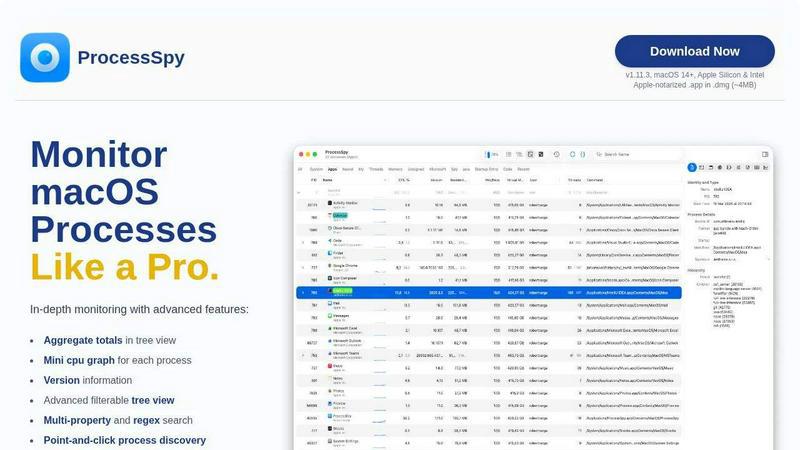
ProcessSpy is a powerful macOS application designed to be the native alternative to Sysinternals Process Explorer, enabling users to monitor processes with a level of detail not available in the standard Activity Monitor. Tailored for developers and power users, it provides a comprehensive view of all processes running on a Mac, including their command-line arguments, paths, and version details. The main value proposition of ProcessSpy lies in its ability to visualize process trees, inspect open files, view environment variables, and terminate unresponsive applications quickly. By using native APIs and UI elements, ProcessSpy ensures a smooth, responsive experience that integrates seamlessly with macOS. Whether you are troubleshooting performance issues or managing multiple applications, ProcessSpy equips you with the necessary tools to gain in-depth insights into your system's processes.
Features of ProcessSpy
Advanced Tree View
The Advanced Tree View feature presents a detailed, hierarchical representation of all processes. It allows users to filter and search in real-time, providing aggregate totals for CPU, Memory, and Threads. This helps visualize resource allocation and process relationships effectively.
Javascript Filters
ProcessSpy supports advanced filtering through Javascript, allowing users to create complex queries with multiple conditions. This feature enables a high level of customization for process searches, making it easier to pinpoint specific processes based on intricate criteria.
Process History Recording
This feature enables users to record historical values for CPU, Memory, and Threads for each process. Users can export this data to CSV for analysis, making it an invaluable tool for performance tracking and debugging.
Multi-Property and Regex Search
The tool features a quick-search functionality that supports regular expressions and multiple property searches simultaneously. Users can efficiently locate processes by specifying various attributes, such as names or command-line options, enhancing the usability of the application.
Use Cases of ProcessSpy
Troubleshooting Application Performance
Developers can utilize ProcessSpy to diagnose performance issues within applications by monitoring CPU and memory usage in real-time. By visualizing process trees, they can identify resource hogs and optimize their applications accordingly.
Managing Multiple Java Applications
For users managing several Java applications with varying JDK versions, ProcessSpy provides crucial visibility into each process. By showing full command-line info and version details, developers can quickly determine which process corresponds to which application.
Analyzing Process Relationships
System administrators can leverage ProcessSpy to analyze relationships between processes, such as which processes are spawned by others. This insight is essential for understanding system behavior and ensuring that applications function as intended.
Exporting Data for Further Analysis
The ability to export process data to CSV allows users to conduct detailed analyses outside of the application. This feature is particularly useful for performance audits or when compiling reports for system optimization.
Frequently Asked Questions
Is ProcessSpy safe to install on my Mac?
Yes, ProcessSpy is Apple-notarized and distributed as a signed .app within a .dmg file. It has been verified to be safe for use on both Intel and Apple Silicon Macs.
Does ProcessSpy support older versions of macOS?
ProcessSpy is specifically designed for macOS 14 and newer versions, ensuring compatibility with the latest features and security updates of the operating system.
What is the license model?
The licensing model allows one user to install ProcessSpy on unlimited devices. This includes lifetime updates and access to new features, making it a cost-effective solution for users.
How does ProcessSpy compare to Activity Monitor?
Unlike Activity Monitor, ProcessSpy provides detailed command-line information, distinguishes between similarly named processes, offers advanced filtering options, and supports historical tracking of process data, making it a more robust tool for in-depth process management.
Similar to ProcessSpy


StackLedge
A strictly human-verified software directory. Discover active SaaS apps, practical AI tools, and custom n8n workflows without bot-scraped spam.

WidgIq
Provide an AI-powered customer support widget for your website

Product Launch Checklist
A free launch checklist for SaaS, apps, AI tools and more. Every step says why it matters and when you can skip it.

Forms Plugin
The #1 Native Form Builder Plugin for Framer - No Code, No Embeds, No External Platforms.

Chatit Me - Free Random Chat Alternative
Chat with random strangers online for free on ChatIt.me. Enjoy safe, anonymous, and instant 1-on-1 conversations with people worldwide

Slaky
AI Visibility rankings for startups with verified metrics

VidhyaGen
Fast, free, and privacy-first browser tool to convert, crop, resize, and compress images locally without server uploads.