

RoomCreator
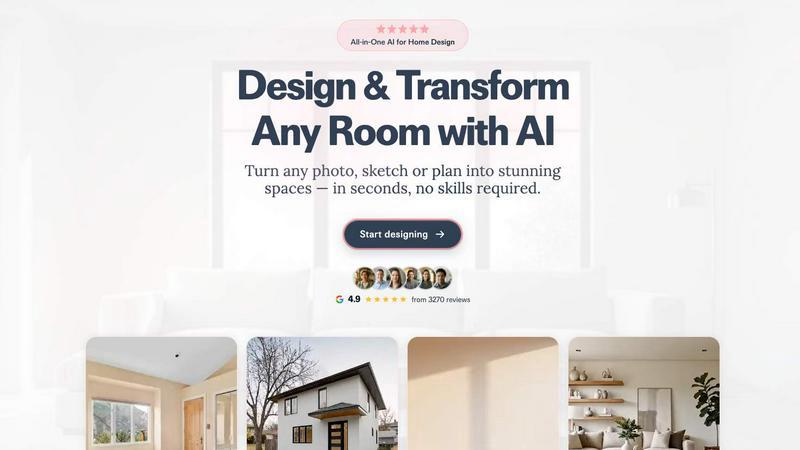
RoomCreator instantly transforms your room photos into stunning AI designs with no skills required.
About RoomCreator
RoomCreator is an all-in-one AI-powered home design platform that empowers homeowners, DIY enthusiasts, and real estate professionals to visualize and transform any space with unprecedented speed and ease. The core value proposition is simple: turn any photo, sketch, or plan into stunning, hyper-realistic visualizations in seconds, eliminating the need for expensive design software, professional photoshoots, or lengthy design cycles. It is built for anyone who wants to make confident design decisions by seeing the potential of a space before committing time and money to renovations, redecorating, or staging.
The platform caters to a wide audience, including homeowners looking to test paint colors and furniture arrangements, real estate agents needing to enhance property listings with virtual staging, and individual investors evaluating renovation potential for flips or rentals. RoomCreator's suite of specialized AI tools goes beyond simple filters, offering smart layout changes, precise area editing, and even motion video creation. By providing 10 free credits to start with no credit card required, it lowers the barrier to entry, allowing users to experiment with styles from Modern and Scandinavian to Bohemian and Coastal, ultimately turning inspiration into actionable, visual reality for any room or exterior.
Features of RoomCreator
Instant AI Interior Redesign
This flagship feature allows users to upload a single photo of any room—whether it's messy, pixelated, or just a rough sketch—and receive multiple professionally designed redesigns in about 10 seconds. The AI intelligently applies new styles, suggesting smart furniture layouts, cohesive color palettes, updated flooring, and realistic lighting that fits the specific dimensions and perspective of the uploaded space, providing a comprehensive before-and-after preview.
Exterior Design Visualizer
Perfect for boosting curb appeal, this tool enables users to test changes to their home's exterior using just one photo. Homeowners can visualize different paint colors, siding materials, roofing styles, and landscaping elements instantly. This allows for confident decision-making before undertaking costly exterior renovations or repainting projects, and helps real estate agents create more attractive listings.
Precision Brush Editor
This feature provides granular control by allowing users to brush over specific areas of an image to make changes without regenerating the entire scene. Want to remove an old sofa or try a new artwork on a single wall? Simply brush over the area, and the AI will edit only that selection, enabling precise decor swaps, object removal, or color adjustments while preserving the rest of the room.
Empty Room Generator & Sketch to Render
With one tap, users can declutter any room photo, instantly removing all furniture and objects to reveal a clean canvas. This is ideal for seeing a space's true potential. Additionally, the platform can transform hand-drawn sketches or layout plans into photorealistic interior images, bridging the gap between early conceptual ideas and realistic visualization seamlessly.
Use Cases of RoomCreator
Home Renovation Planning
Homeowners can avoid costly mistakes by using RoomCreator to visualize major changes before purchasing materials or hiring contractors. Test new kitchen cabinet styles, experiment with bold living room wall colors, or see how different flooring options would look, all based on a photo of the actual space, leading to more confident and satisfying renovation outcomes.
Real Estate Listing Enhancement
Real estate agents can transform empty, cluttered, or outdated rooms in property photos into beautifully staged and stylish interiors. This virtual staging helps potential buyers visualize themselves in the home, making listings stand out in competitive markets and potentially accelerating sales without the expense and logistics of physical staging.
Interior Design Experimentation
DIY lovers and design enthusiasts can freely explore their creativity without risk. The tool allows for rapid experimentation with dozens of predefined themes (like Japandi, Country, or Bohemian) to discover a personal style. Users can see how new furniture arrangements improve flow and function or try out bold decor choices in a risk-free digital environment.
Investment Property Analysis
Individual investors and house flippers can use RoomCreator to evaluate a property's renovation potential and showcase its future value. By generating realistic "after" visuals of a dated space, they can make better investment decisions, plan budgets more accurately, and create compelling presentations for partners or clients based on visualized potential.
Frequently Asked Questions
How accurate and realistic are the AI-generated redesigns?
RoomCreator's AI is trained to produce hyper-realistic previews that respect the geometry, lighting, and proportions of your original photo. While it provides a highly accurate visualization of styles, colors, and layouts, it is intended as a powerful design aid for decision-making. For exact material matches, always consult physical samples alongside the AI-generated images.
What kind of photos work best with RoomCreator?
The platform is designed to be forgiving. You can upload clear, well-lit photos for the best results, but it also accepts messier rooms, pixelated images, or even rough hand-drawn sketches. Ensure the key areas of the room you want to redesign are visible in the shot for the AI to work most effectively.
Is there a free trial available?
Yes, RoomCreator offers a free trial that provides 10 credits upon sign-up, with no credit card required. This allows you to test several redesigns and explore the core features to see how the platform works for your specific projects before choosing a paid plan.
Can I use RoomCreator for commercial purposes, like my real estate business?
Absolutely. RoomCreator is an excellent tool for commercial use cases. Real estate agents, interior designers, and investors frequently use it to create visuals for client presentations, property listings, and renovation plans. Paid subscription plans are tailored to support higher volume usage typical for professional needs.
Similar to RoomCreator


Gamespad Taster
A simple online gamepad tester that helps you check controller buttons, sticks, triggers, D-pad, and other inputs instantly.

tally counter
Online tally counter for tracking attendance, workouts, inventory, visitors, sports scores, habits, and everyday counting tasks.

PDFKing
PDFKing is a free online PDF toolkit designed to make everyday document tasks simple, fast, and accessible. It brings essential PDF tools together in

Built2Win AI
Custom PHP websites, AI Indexing Pack ($599 one‑time), and WebAgentScan SaaS ($9/mo). MCP, A2A, llms.txt, full ownership.


Wisegrid
Wisegrid helps project-driven teams manage projects, workflows, resources, and reporting in a familiar spreadsheet-style workspace.