

BoltShot
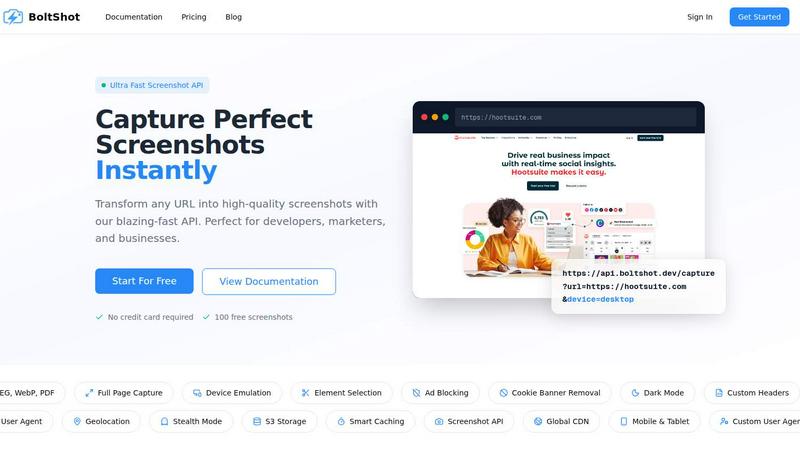
BoltShot is a simple, ultra-fast API that transforms any URL into a perfect screenshot without browser ops.
About BoltShot
BoltShot is a high-performance website screenshot API designed to transform any URL into pixel-perfect, high-quality screenshots through a simple and efficient API request. It supports multiple output formats including PNG, JPEG, WebP, and PDF, giving developers and businesses the flexibility to capture web content exactly as needed. The platform handles full-page captures automatically, supports device emulation for mobile, tablet, and desktop viewports, and allows for custom viewport settings to ensure precise rendering across any scenario. Beyond basic capture, BoltShot includes powerful features such as CSS selector-based element targeting, ad blocking, cookie banner removal, and smart caching to deliver clean, distraction-free results. Advanced capabilities like S3 uploads with CDN delivery, custom user agents, geolocation emulation, stealth mode, and custom headers make it suitable for sophisticated workflows. Designed for developers, marketers, and businesses, BoltShot eliminates the need to manage complex browser clusters or infrastructure, offering a reliable, scalable solution for e-commerce previews, automated reporting, web archiving, testing, compliance monitoring, and many other applications. With a global CDN, rapid response times under 100 milliseconds, and a 99.9 percent success rate, BoltShot provides a seamless experience for capturing screenshots at scale.
Features of BoltShot
Multiple Output Formats and Full-Page Capture
BoltShot supports a comprehensive range of output formats including PNG, JPEG, WebP, and PDF, allowing users to choose the best format for their specific needs. The full-page capture feature automatically scrolls through entire web pages to capture content from top to bottom, ensuring no information is missed. This is particularly useful for long-form content, documentation pages, and e-commerce product listings where a complete visual record is required. Users can also capture specific page elements using CSS selectors, providing granular control over what appears in the final screenshot.
Device Emulation and Custom Viewport Settings
The platform offers robust device emulation capabilities that simulate mobile, tablet, and desktop environments with pixel-perfect precision. Developers can test how their websites render across different screen sizes and orientations without needing physical devices. Custom viewport settings give users complete control over the capture dimensions, enabling them to create screenshots tailored to specific requirements. This feature is essential for responsive design testing, cross-platform verification, and creating consistent visual assets for marketing and documentation purposes.
Clean Capture with Ad Blocking and Cookie Banner Removal
BoltShot includes built-in features to produce clean, professional screenshots by automatically removing distractions. The ad blocking functionality filters out advertisements, ensuring that screenshots focus on the actual content. Cookie banner removal automatically detects and eliminates consent popups and notification overlays, while the system also handles modal dialogs and other intrusive elements. These capabilities save significant time compared to manual cleanup and ensure that every screenshot is ready for immediate use in presentations, reports, or documentation.
Advanced Capabilities Including S3 Storage and Stealth Mode
For enterprise and advanced users, BoltShot offers sophisticated features such as S3 uploads with CDN delivery, enabling secure storage and fast global distribution of captured screenshots. Custom user agents allow users to simulate different browsers and devices, while geolocation emulation helps test location-specific content. Stealth mode prevents websites from detecting automated capture, ensuring consistent results even on sites with anti-bot measures. Smart caching with configurable TTL values optimizes performance by storing frequently requested screenshots, reducing latency and API usage costs.
Use Cases of BoltShot
Automated Reporting and Dashboard Generation
Businesses can leverage BoltShot to automatically capture screenshots of dashboards, analytics reports, and key performance indicators on a scheduled basis. The API integrates seamlessly into existing workflows, enabling teams to generate visual snapshots of critical data without manual intervention. This is particularly valuable for weekly or monthly reporting, where consistent, up-to-date visuals are required for stakeholder presentations and internal reviews. The full-page capture and clean rendering features ensure that complex data visualizations are captured completely and without distractions.
E-commerce Product Previews and Monitoring
Online retailers and marketplace operators use BoltShot to generate product previews, monitor competitor pricing pages, and capture product listings for catalog creation. The device emulation feature allows businesses to see how products appear on mobile versus desktop, ensuring a consistent shopping experience. Element targeting using CSS selectors enables precise capture of product images, prices, and descriptions, which can be used for price comparison tools, inventory tracking, and promotional material generation at scale.
Web Archiving and Compliance Monitoring
Organizations involved in web archiving, legal compliance, and regulatory monitoring rely on BoltShot to capture permanent visual records of web pages. The stealth mode and custom user agent features ensure that captures are not blocked or altered by target websites. Cookie banner removal and ad blocking produce clean, uncluttered screenshots that accurately represent the intended content. These capabilities are essential for maintaining historical records, documenting regulatory compliance, and preserving evidence for legal proceedings.
Visual Regression Testing and Quality Assurance
Development teams use BoltShot as part of their continuous integration and deployment pipelines to perform visual regression testing. By capturing screenshots of web applications before and after code changes, teams can quickly identify unintended visual differences. The custom viewport settings and device emulation features allow QA engineers to test across multiple screen sizes and orientations simultaneously. Smart caching reduces the time required for repeated captures, making it feasible to integrate screenshot testing into automated build processes without significant performance overhead.
Frequently Asked Questions
What output formats does BoltShot support?
BoltShot supports four primary output formats: PNG, JPEG, WebP, and PDF. PNG is ideal for high-quality images with transparency, JPEG offers smaller file sizes for photographs and complex graphics, WebP provides superior compression for web use, and PDF is perfect for document-style captures that require printing or archiving. Users can specify the desired format in the API request parameters.
How does BoltShot handle cookie banners and popups?
BoltShot automatically detects and removes cookie consent banners, notification overlays, modal dialogs, and other intrusive elements before capturing the screenshot. This clean capture feature uses advanced detection algorithms to identify common patterns used by websites for these elements. The result is a distraction-free screenshot that focuses on the actual content, saving users from manual post-processing.
Can I capture specific elements on a page instead of the full page?
Yes, BoltShot allows you to capture specific page elements using CSS selectors. You can target individual components such as product images, pricing tables, navigation menus, or any other element that can be identified by a CSS selector. This feature provides granular control over the capture area and is particularly useful for generating consistent visual assets for catalogs, comparison tools, and documentation.
Is there a free trial available for BoltShot?
BoltShot offers a free tier that includes 100 screenshots with no credit card required. This allows developers and businesses to test the API, evaluate its performance, and integrate it into their workflows before committing to a paid plan. The free tier provides access to all core features, including multiple output formats, device emulation, and clean capture capabilities.
Similar to BoltShot

Product Launch Checklist
A free launch checklist for SaaS, apps, AI tools and more. Every step says why it matters and when you can skip it.

Forms Plugin
The #1 Native Form Builder Plugin for Framer - No Code, No Embeds, No External Platforms.

Chatit Me - Free Random Chat Alternative
Chat with random strangers online for free on ChatIt.me. Enjoy safe, anonymous, and instant 1-on-1 conversations with people worldwide

Slaky
AI Visibility rankings for startups with verified metrics

VidhyaGen
Fast, free, and privacy-first browser tool to convert, crop, resize, and compress images locally without server uploads.


PNG to SVG
Free, private image conversion tools that run entirely in your browser.