

JustPDF
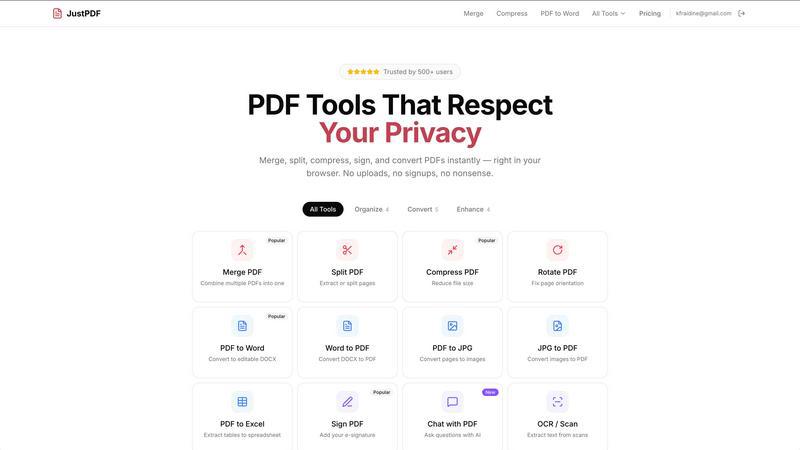
JustPDF is a privacy-first, browser-based toolkit with 17 free tools to edit, convert, and manage your PDFs entirely offline.
About JustPDF
JustPDF is a comprehensive, privacy-first suite of PDF tools that operates entirely within your web browser. It provides 17 professional-grade utilities for managing, converting, editing, and securing PDF documents. The platform's core value proposition and primary differentiator is its commitment to user privacy and security. Unlike competing online services such as Smallpdf or iLovePDF, which require uploading files to remote servers for processing, JustPDF leverages advanced JavaScript and WebAssembly technology to handle all operations locally on the user's device. This means your sensitive documents—whether they are contracts, tax forms, academic papers, or personal identification—never leave your computer. Users can independently verify this by monitoring the Network tab in their browser's Developer Tools, which will show no external file transfers during processing. Designed for professionals, students, and anyone handling confidential information, JustPDF offers a robust free tier with three operations per day and a highly affordable Pro plan. Its architecture also makes it functional offline and ensures compliance with data protection standards like FERPA for educational use, making it a trustworthy and efficient solution for modern PDF tasks.
Features of JustPDF
100% Browser-Based Processing
This is the foundational feature of JustPDF. All 17 tools, from merging and compressing to AI-powered chat, are executed directly within the user's browser using client-side JavaScript and WebAssembly. This local processing guarantees absolute data privacy, as files are never uploaded to any external server. It also allows the tools to function without a constant internet connection once the web app is loaded, providing reliable access and faster processing speeds by eliminating upload and download latency for the core operation.
Comprehensive PDF Tool Suite
JustPDF consolidates a wide array of essential PDF functionalities into one seamless interface. The suite includes tools for organization (Merge, Split, Rotate), optimization (Compress), conversion (to and from Word, JPG, Excel), and security (Unlock, Sign). It also offers specialized tools like converting WebP/HEIC images to PDF, converting PDFs to grayscale, and an AI-powered "Chat with PDF" feature for document interrogation. This eliminates the need to juggle multiple websites or software for different PDF tasks.
Privacy-First & FERPA-Compliant Design
Built with confidentiality as a core principle, JustPDF's architecture is designed to meet stringent privacy needs. By ensuring files stay on the user's device, it mitigates risks associated with data breaches, unauthorized server access, or data mining. This commitment is formally recognized in its compliance with FERPA (Family Educational Rights and Privacy Act), making it a safe and approved tool for educators, administrators, and students to handle sensitive academic records and submissions.
Accessible Free Tier & Affordable Pro Plan
JustPDF is committed to accessibility. It offers a completely free tier that requires no account creation or sign-in, allowing users to perform up to three operations per day with full functionality and no watermarks. For power users, the Pro plan provides unlimited access to all tools at a starting price of just $4 per month. This straightforward, low-cost pricing model removes barriers for individuals and professionals who require frequent PDF manipulation without ongoing privacy concerns.
Use Cases of JustPDF
Handling Sensitive Legal and Business Documents
Lawyers, consultants, and business professionals often work with confidential contracts, financial reports, and client information. Using JustPDF to merge, sign, compress, or convert these documents ensures that sensitive data never traverses the internet to a third-party server, maintaining attorney-client privilege and corporate confidentiality. The e-signature tool allows for secure signing directly within the browser.
Academic and Student Workflow
Students, researchers, and school administrators can safely use JustPDF for compiling research papers, submitting assignments, converting lecture slides, or compressing large portfolios for email submission. Its FERPA-compliance makes it ideal for handling documents containing student grades, IDs, or official transcripts, providing peace of mind for educational institutions about data privacy regulations.
Personal Document Management
Individuals managing personal records like tax forms, insurance paperwork, leases, or scanned identification can use JustPDF to organize their digital files. They can combine multiple scans into a single PDF, compress files for email attachment limits, or convert received PDFs into editable Word formats for filling out—all without exposing their personal information to online services.
On-the-Go and Offline PDF Editing
Professionals traveling or working in areas with unreliable internet can rely on JustPDF. Since the processing engine runs in the browser, core functions remain available even without an active connection after the initial page load. This is invaluable for last-minute edits before a presentation, processing documents on a flight, or working in remote locations where data security and connectivity are concerns.
Frequently Asked Questions
Is JustPDF really free, and what are the limits?
Yes, JustPDF offers a genuinely free tier that does not require you to create an account. You can perform up to three total operations per day across all tools. These free operations include full functionality without any watermarks on the output files. Once you exceed three operations in a 24-hour period, you will be prompted to upgrade to the Pro plan for unlimited access.
How does JustPDF protect my privacy compared to other online tools?
JustPDF processes your files entirely within your browser using client-side technology. Other popular online tools typically upload your file to their remote servers for processing. With JustPDF, you can confirm this by opening your browser's Developer Tools (F12), navigating to the Network tab, and observing that no file data is transmitted to an external server when you use a tool. Your files never leave your device.
What is the "Chat with PDF" feature?
The "Chat with PDF" is an AI-powered tool that allows you to interact with the content of your PDF document. You can upload a PDF and ask the AI questions about its contents, such as requesting summaries, extracting specific data points, or finding key information. This processing is also performed locally where possible, maintaining the privacy of the document's content during the interrogation.
Do I need to install any software to use JustPDF?
No installation is required. JustPDF is a web application that runs directly in your modern web browser (like Chrome, Firefox, Safari, or Edge). You simply visit the JustPDF website, select your tool, and begin working. There is no need to download or install any desktop software, plugins, or extensions, making it instantly accessible from any device.
Pricing of JustPDF
JustPDF operates on a freemium model. The free plan allows for 3 operations per day with no account required and no watermarks on output files. For users needing unlimited access, the Pro plan starts at $4 per month (billed annually) or a slightly higher monthly rate. The Pro subscription provides unlimited use of all 17 tools, priority processing, and access to any new features introduced. This pricing structure is designed to be straightforward and affordable for both casual and professional users.
Similar to JustPDF

Novastart
Apps and files on an infinite canvas where people and AI agents work together.

ButterShare
Transfer files between iPhone, Android, Windows, and Mac directly from your browser. Free, secure, and private. No apps, cloud storage, or signup.

AI Email Filter
AI Email Filter sorts incoming mail into folders using plain-language prompts you write. Works with any IMAP mailbox; bring your own LLM if you want.

Product Launch Checklist
A free launch checklist for SaaS, apps, AI tools and more. Every step says why it matters and when you can skip it.

Kody Tools
Free collection of online developer utilities, code formatters, and digital converters designed to streamline your daily workflow.

tally counter
Online tally counter for tracking attendance, workouts, inventory, visitors, sports scores, habits, and everyday counting tasks.


iHatePosting
Create once, tailor for each platform, and schedule posts across 14 social networks from one simple dashboard.