

Square Face Generator
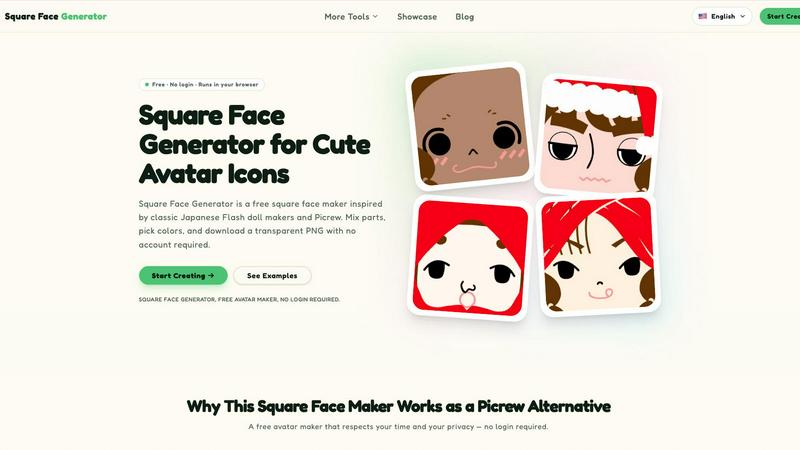
Square Face Generator is a free browser-based avatar maker that lets you mix parts and colors to create cute square icons with transparent PNG.
About Square Face Generator
Square Face Generator is a free, browser-based avatar creation tool that specializes in building charming square-shaped characters. Inspired by classic Japanese Flash doll makers and the popular Picrew platform, this tool allows users to mix and match over 200 customizable parts across 12 distinct categories. These categories include skin tones, bangs, side hair, eyes, nose, mouth, brows, lashes, blush, glasses, hats, and outfits. With millions of potential combinations, users can create truly unique and personalized avatars for any purpose.
The tool is designed with user privacy and convenience as top priorities. Everything renders locally within your browser, meaning no images or data ever leave your device. There is no need to create an account, log in, or provide any personal information. The interface is responsive and touch-friendly, working seamlessly on desktop computers, tablets, and smartphones. The primary output is a transparent 256x256 pixel PNG file that can be downloaded instantly with a single click. This makes Square Face Generator an ideal solution for anyone needing a quick, private, and high-quality avatar maker without any financial commitment or software installation.
Features of Square Face Generator
Extensive Customization Library
Choose from over 200 unique pieces spread across 12 categories. This library includes a wide variety of skin tones, hairstyles (bangs and side hair), facial features (eyes, nose, mouth, brows, lashes), accessories (blush, glasses, hats), and outfits. This depth of selection allows for millions of distinct combinations, ensuring your avatar can be as unique as you are.
Full Color Customization
Beyond selecting pre-made parts, you can fine-tune the colors of your avatar. Dedicated color pickers allow you to adjust skin tones, hair colors, and outfit shades to your exact preference. For precise control, the tool supports HEX color input, enabling you to match specific brand colors or personal favorites for a truly customized look.
Instant Transparent PNG Export
Once your avatar is complete, you can download it instantly. The tool exports a 256x256 pixel PNG file with a transparent background. This format is universally compatible and perfect for use as a profile picture, game asset, or graphic element. There are no watermarks, paywalls, or limits on the number of downloads.
Privacy-First Local Processing
All avatar rendering and image processing happens directly within your web browser. Your data, including the combinations you create and the final image, never leaves your device or gets uploaded to any external server. This ensures complete privacy and security, requiring no account creation or login to use the tool.
Use Cases of Square Face Generator
Social Media Profile Pictures
Create a unique and charming avatar for your profiles on platforms like Discord, X (formerly Twitter), Instagram, and TikTok. A custom square face stands out from standard photos and allows you to express your personality or mood without using a personal photograph. The transparent PNG format is ideal for these platforms.
Indie Game Development Assets
Indie game developers can use Square Face Generator to quickly create placeholder or final NPC portraits, player avatars, and character icons. The square format and transparent background make it easy to integrate into user interfaces. This tool provides a fast and free solution for prototyping character visuals without needing an artist.
Team and Community Branding
Create a unified, cohesive look for a guild, club, class, or online community. Each member can use the tool to create their own avatar using a shared set of base styles, allowing for individual personality while maintaining a consistent group aesthetic. This is perfect for Discord servers, forums, or team rosters.
Creative and Educational Projects
Use the generated avatars in slideshows, posters, stickers, school assignments, or personal zines. The simple, charming art style is versatile and appealing for a wide range of creative projects. The ease of use and free access make it an excellent resource for students, educators, and hobbyists.
Frequently Asked Questions
Is it really free?
Yes, Square Face Generator is completely free to use. Every part, every color option, and every download is available at no cost. There are no paywalls, no watermarks, and you do not need to create an account or log in to access any feature.
What size are the exports?
The tool exports your final avatar as a 256x256 pixel PNG image with a transparent background. This standard square size is perfectly suited for profile pictures on most social media platforms, game icons, and other common avatar slots.
Can I use my icon commercially?
You should review the specific terms of service on the website for the most accurate and current information regarding commercial use. Generally, assets created with such tools are intended for personal and creative use, and commercial rights may vary.
Do I need to install anything?
No installation is required. Square Face Generator runs entirely in your web browser. It uses modern web technologies to render everything locally on your device. You simply visit the website and start creating immediately.
Explore more in this category:
Similar to Square Face Generator

Nano AI
Create and edit AI images, generate videos, and compare models in one creative workbench.

Screen Issues
Free Online Screen Test Tool - Instantly diagnose dead pixels, lines, color issues, and flickering. Multiple test modes, no download needed.

FreeVideoGenerator
Free AI video generator: turn text prompts and photos into video clips with Sora 2, Veo 3.1, Wan and more. Free starter credits, no watermark download

Soul Cinema
Film-grade AI stills from a written shot: cinematographer lighting, one consistent cast across a sequence, and full-resolution 8K exports.

FreeCreate
Create AI images from text or reference photos and turn prompts or still images into short videos with FreeCreate. Start free—no account needed.

AIPetGen
AI pet image generator with photo-to-pet and free credits


StyleCut
StyleCut is an AI hairstyle changer that lets you preview 70+ haircut ideas on your own photo before visiting the salon.