

ytskim
ytskim lets you transcribe and summarize YouTube videos quickly using AI, saving you time and effort.
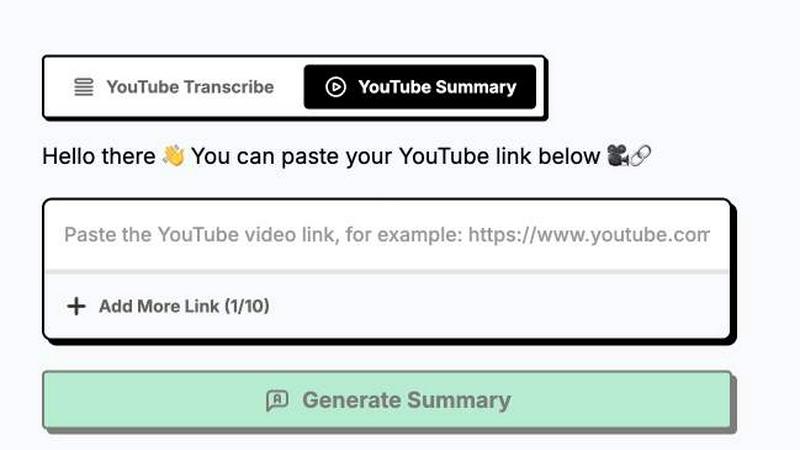
About ytskim
ytskim is a specialized AI-powered tool designed to extract accurate transcripts and generate structured summaries from any YouTube video in seconds. The product addresses a critical need for content creators, researchers, students, and professionals who regularly consume video content and require quick access to written text and concise overviews. Instead of manually transcribing hours of video footage or watching entire videos to capture key points, users can leverage ytskim to automate these time-consuming tasks with high precision.
The core value proposition of ytskim lies in its dual functionality. First, it provides verbatim transcripts that capture every spoken word with accuracy, making it suitable for documentation, accessibility, and content repurposing. Second, it goes beyond simple transcription by analyzing the transcript and generating structured summaries that highlight main ideas, key arguments, and important details. This structured output saves users significant time by allowing them to grasp the essence of a video without watching it in its entirety.
ytskim is built for a diverse audience including content creators who need to repurpose video content into blog posts or social media snippets, students who want to study lecture materials more efficiently, researchers analyzing video interviews or presentations, and professionals who need to stay informed with industry videos but have limited time. The tool is designed to be intuitive and fast, processing videos within seconds and delivering results that are ready to use. By combining transcription and summarization into a single workflow, ytskim eliminates the need for multiple tools and manual effort, making video content more accessible and actionable.
Features of ytskim
High Accuracy Transcription
ytskim utilizes advanced speech recognition technology to convert spoken language from YouTube videos into accurate written text. The system is trained to handle various accents, speaking speeds, and audio qualities, ensuring that the transcript captures the full content of the video with minimal errors. This feature is essential for users who rely on precise text for documentation, subtitling, or content analysis. The transcription process is optimized for speed, typically completing within seconds after the video URL is submitted, allowing users to quickly access the textual representation of any video.
Structured Summary Generation
Beyond simple transcription, ytskim automatically analyzes the full transcript to produce a structured summary that distills the video content into its most important elements. The summary is organized into logical sections, including an overview, key points, main arguments, and conclusions. This structure enables users to quickly understand the video's message without watching the entire content. The summarization algorithm is designed to preserve context and meaning, avoiding generic or irrelevant information. Users can rely on the summary to determine if the full video is worth watching or to extract actionable insights efficiently.
Instant Processing Speed
Time efficiency is a core design principle of ytskim. The tool processes YouTube videos and delivers both transcripts and summaries within seconds, regardless of the video length. This rapid turnaround eliminates the waiting time associated with manual transcription or less optimized tools. Users can paste a video URL, click a button, and receive results almost immediately. This speed is particularly valuable for professionals and students who need to process multiple videos in a single session or who require quick access to information during time-sensitive tasks.
User-Friendly Interface
ytskim features a clean and intuitive interface that minimizes the learning curve for new users. The workflow is straightforward: users simply paste a YouTube video link into the designated input field, and the tool handles the rest. The results are displayed in a clear, readable format with options to copy text, download files, or export the content for further use. No technical expertise is required to operate the tool, making it accessible to a wide range of users from different backgrounds. The interface is designed to reduce friction and allow users to focus on consuming the extracted content rather than navigating complex settings.
Use Cases of ytskim
Content Repurposing for Creators
Content creators can use ytskim to transform their YouTube videos into written blog posts, social media captions, or newsletter content. By extracting the transcript and summary, creators can quickly repurpose video ideas into text-based formats that reach different audience segments. For example, a creator can take a 20-minute tutorial video and generate a concise summary for a LinkedIn post, or use the full transcript as the foundation for a detailed blog article. This workflow saves hours of manual writing and ensures consistency between video and text content.
Academic Research and Study
Students and researchers can leverage ytskim to process educational videos, lectures, and conference presentations. Instead of watching lengthy recordings multiple times, users can obtain a structured summary that highlights key theories, definitions, and examples. The transcript serves as a searchable reference for citations or detailed analysis. This use case is particularly valuable for online courses, where students may need to review material quickly before exams or assignments. ytskim enables more efficient study sessions by condensing video content into digestible text.
Professional Development and Training
Professionals who need to stay updated with industry trends, training videos, or webinars can use ytskim to quickly capture the essential information from video content. For instance, a marketing professional can process a 45-minute webinar on SEO strategies and receive a summary of actionable tactics within seconds. This allows them to apply new knowledge immediately without dedicating significant time to watch the entire video. ytskim also helps in documenting training materials for team reference or compliance purposes.
Accessibility and Documentation
ytskim serves as an accessibility tool for individuals who prefer reading over watching videos or who have hearing impairments. By providing accurate transcripts, the tool makes video content more inclusive and accessible. Additionally, organizations can use ytskim to create written documentation of video meetings, presentations, or recorded training sessions. This documentation is useful for archiving, sharing with absent team members, or maintaining a searchable knowledge base. The structured summaries further enhance accessibility by providing a quick overview for users who need only the main points.
Frequently Asked Questions
How does ytskim work?
ytskim works by taking a YouTube video URL as input. The tool then uses speech recognition technology to transcribe the audio track of the video into text. After the transcription is complete, an AI-powered summarization algorithm analyzes the text to identify the most important points, arguments, and conclusions. The final output includes both the full transcript and a structured summary, which are displayed to the user within seconds. The entire process is automated and requires no manual intervention from the user.
Is ytskim free to use?
The current content does not specify pricing details for ytskim. Users should visit the official website or contact the product team to get accurate information about any free tiers, trial periods, or subscription plans. Many similar tools offer limited free usage or pay-as-you-go options. It is recommended to check the product page for the most up-to-date pricing and availability information.
What types of YouTube videos does ytskim support?
ytskim is designed to work with any publicly accessible YouTube video. This includes educational content, tutorials, vlogs, interviews, webinars, lectures, and entertainment videos. The tool processes the audio track, so the quality of the transcript depends on the audio clarity, background noise, and speaking clarity. Videos with clear speech and minimal background interference will yield the most accurate results. Private or unlisted videos may require additional access permissions.
Can I download the transcript and summary from ytskim?
Yes, ytskim provides options to download the generated transcript and summary in common text formats. Users can typically copy the text directly from the interface, download it as a plain text file, or export it to other applications. This functionality allows users to save, share, or further edit the content as needed. The exact download options may vary based on the product version, but the tool is designed to facilitate easy access to the output data.
Similar to ytskim

Novastart
Apps and files on an infinite canvas where people and AI agents work together.

ButterShare
Transfer files between iPhone, Android, Windows, and Mac directly from your browser. Free, secure, and private. No apps, cloud storage, or signup.

AI Email Filter
AI Email Filter sorts incoming mail into folders using plain-language prompts you write. Works with any IMAP mailbox; bring your own LLM if you want.

Product Launch Checklist
A free launch checklist for SaaS, apps, AI tools and more. Every step says why it matters and when you can skip it.

Kody Tools
Free collection of online developer utilities, code formatters, and digital converters designed to streamline your daily workflow.

tally counter
Online tally counter for tracking attendance, workouts, inventory, visitors, sports scores, habits, and everyday counting tasks.


iHatePosting
Create once, tailor for each platform, and schedule posts across 14 social networks from one simple dashboard.