

Caesura
Caesura is a macOS menu bar app that reminds you to drink water, stretch, rest your eyes, and breathe using science-backed intervals.
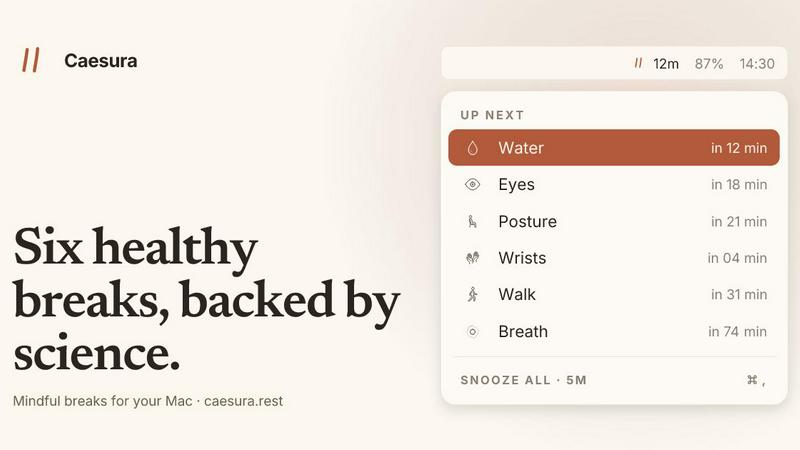
About Caesura
Caesura is a calm, minimalist macOS menu-bar break manager designed specifically for knowledge workers, developers, designers, and anyone who spends long, uninterrupted hours at a desk. Unlike traditional break reminders that use arbitrary intervals or demand account creation, Caesura is built on a foundation of scientific research and respect for your workflow. The application manages six distinct healthy habits -- drinking water, walking, stretching your wrists, resting your eyes, checking your posture, and breathing -- each on its own independent schedule derived from peer-reviewed studies rather than round numbers. What sets Caesura apart is its intelligent coalescing system: when two reminders fall close together in time, it merges them into a single, gentle break prompt so you are never interrupted twice in a row. The app also automatically pauses all timers when it detects you are on a video call, sharing your screen, using a fullscreen application, or have Do Not Disturb enabled, resuming exactly where it left off. There are no accounts to create, no telemetry tracking your behavior, and no subscriptions. It is a one-time purchase for $15 with a 14-day free trial, making it a permanent, private tool for sustainable health at your computer.
Features of Caesura
Six Science-Backed Breaks
Caesura schedules reminders for water (every 45 minutes), walking (every 60 minutes), wrists (every 30 minutes), eyes (every 20 minutes), posture (every 30 minutes), and breathing (every 90 minutes). Each interval is drawn directly from published research, not arbitrary round numbers, ensuring your body receives the precise cadence it needs to maintain hydration, circulation, joint health, visual comfort, spinal alignment, and respiratory calm throughout the day.
Intelligent Break Coalescing
When two separate reminders become due within one minute of each other, Caesura intelligently merges them into a single, consolidated break prompt. This prevents the frustration of back-to-back interruptions and respects your focus by delivering one clear action instead of multiple disjointed nudges. The coalescing logic ensures you never feel bombarded by the app.
Automatic Context-Aware Pausing
Caesura watches your system for video calls, screen sharing sessions, fullscreen applications, Do Not Disturb mode, calendar events, and games. When any of these activities are detected, every timer freezes instantly and resumes exactly where it left off once the activity ends. If you had 12 minutes remaining before a water reminder, you still have 12 minutes after the call finishes, preserving your schedule without manual intervention.
Customizable Prompt Styles
Each of the six breaks can be assigned one of three distinct visual styles: a full-screen overlay that demands attention until dismissed, a banner that slides in from the menu bar and auto-dismisses after 30 seconds, or a standard macOS notification for the lightest possible touch. You can also turn any break off entirely or adjust its interval, giving you full control over how and when reminders appear.
Use Cases of Caesura
Deep Work Sessions for Developers and Writers
For professionals who enter extended periods of focused coding or writing, Caesura provides timely, unobtrusive reminders to hydrate and stretch without breaking the flow state. The automatic pausing during fullscreen terminals or IDEs ensures reminders only appear when you are not actively engaged, while the coalescing feature prevents multiple interruptions from accumulating.
Remote Workers with Back-to-Back Video Calls
Remote employees who spend hours in Zoom, Teams, or Slack calls benefit from Caesuras automatic call detection. The app pauses all timers during meetings and resumes them after, ensuring you never receive a break prompt while presenting or speaking. The coalescing feature also consolidates any reminders that became due during the call into a single, manageable break afterward.
Health-Conscious Designers and Creatives
Designers working in fullscreen creative suites like Figma, Photoshop, or Final Cut Pro can rely on Caesura to enforce healthy habits without manual tracking. The eye break reminder (every 20 minutes) prompts the 20-20-20 rule to reduce digital eye strain, while the wrist stretches help prevent repetitive strain injuries from prolonged mouse and tablet use.
Gamers and Streaming Professionals
Gamers and streamers who spend hours in immersive fullscreen applications can use Caesura to maintain basic bodily awareness. The app pauses during active gameplay or streaming sessions and resumes only when the user returns to a non-fullscreen desktop environment, preventing intrusive overlays during critical moments while still encouraging periodic breaks.
Frequently Asked Questions
How does Caesura detect that I am on a call or busy?
Caesura monitors your systems camera activity, screen sharing status, fullscreen application state, Do Not Disturb mode, calendar events, and whether FaceTime is in the foreground. It does not record or transmit any data; all detection happens locally on your machine. When any of these signals are active, all timers freeze and resume automatically once the activity ends.
Can I customize the interval for each break?
Yes. Every break has its own default interval based on scientific research, but you can adjust the timing for any break independently. You can also turn off any break entirely if you do not wish to receive reminders for that specific habit. The app remembers your customizations across sessions.
Is Caesura a subscription or a one-time purchase?
Caesura is a one-time purchase for $15. There are no subscriptions, no recurring fees, and no account required. You can try the app free for 14 days before deciding to buy. The purchase unlocks the full feature set permanently on your Mac.
What macOS version is required to run Caesura?
Caesura requires macOS 14 or later. It is designed as a lightweight menu-bar application that runs in the background with minimal system resource usage. No account creation, credit card storage, or internet connection is needed for the app to function beyond the initial download and trial activation.
Explore more in this category:
Best Lifestyle & Entertainment tools
Best Personal Development tools
Similar to Caesura

Kody Tools
Free collection of online developer utilities, code formatters, and digital converters designed to streamline your daily workflow.

tally counter
Online tally counter for tracking attendance, workouts, inventory, visitors, sports scores, habits, and everyday counting tasks.


iHatePosting
Create once, tailor for each platform, and schedule posts across 14 social networks from one simple dashboard.

PDFWix
PDFWix is a free online PDF toolkit designed to make everyday PDF tasks simple, fast, and private.

PDFKing
PDFKing is a free online PDF toolkit designed to make everyday document tasks simple, fast, and accessible. It brings essential PDF tools together in