

SlabCalc
SlabCalc provides free concrete calculators, AI crack diagnosis, and city-level cost data for DIYers and contractors.
About SlabCalc
SlabCalc is a comprehensive, free precision toolkit designed for all concrete-related calculations and project planning. It serves a wide range of users, including DIY homeowners tackling weekend projects, professional contractors managing job sites, estimators preparing bids, and property managers overseeing maintenance. The platform eliminates guesswork by providing instant, accurate volume calculations, bag counts, rebar estimates, and material requirements for diverse structures such as slabs, driveways, patios, sidewalks, walls, footings, cinder block walls, post holes, columns, and more. Each calculator outputs ready-to-order quantities in cubic yards, cubic meters, or standard bag sizes (40, 50, 60, and 80 lb), with built-in waste factors to ensure you order enough material. Beyond calculations, SlabCalc features an innovative AI-powered Crack Analyzer that diagnoses concrete cracks from uploaded photos, localized cost data for hundreds of US cities, and a deep knowledge base covering mix selection, curing, sealing, rebar spacing, and common contractor questions. It also includes a free Chrome extension and embeddable widgets for contractor websites. Everything is free, requires no login, is mobile-friendly, and is built to deliver precise, trustworthy numbers without any upsell or hidden fees. Visit slabcalc.co to start your next project with confidence.
Features of SlabCalc
Comprehensive Project Calculators
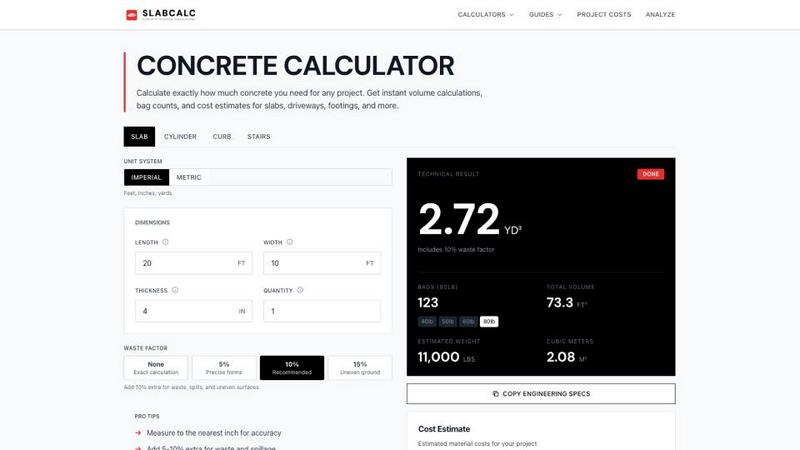
SlabCalc offers over nine distinct shape calculators covering slabs, cylinders, curbs, stairs, columns, walls, footings, circles, and tubes. Each calculator provides instant volume results in cubic yards, cubic meters, or bag counts for 40, 50, 60, and 80 lb bags. Users can select from built-in waste factors ranging from exact calculations to 15% for uneven ground, ensuring accurate material ordering. The calculators also output estimated weight and engineering specifications, making them suitable for both DIY and professional use. Imperial and metric unit systems are fully supported, allowing users to work in feet, inches, yards, or meters.
AI-Powered Crack Analyzer
This unique feature allows users to upload a photo of any concrete crack and receive an AI-powered diagnosis. The system identifies the crack type, assesses severity, determines likely cause, and provides a recommendation on whether the repair is a DIY job or requires a structural engineer. Each diagnosis links to detailed repair guides for that specific crack type, giving users actionable next steps. This tool is invaluable for homeowners assessing driveway cracks, property managers inspecting parking lots, or contractors evaluating structural integrity before a pour.
Localized Cost Data and Estimates
SlabCalc provides concrete pricing data for hundreds of US cities, showing the going rate per cubic yard, per square foot installed, and total project costs for common applications like driveways, patios, slabs, sidewalks, and stamped concrete. After calculating a project volume, users see estimated material costs for bagged concrete, ready-mix concrete, and professional installation. This feature helps users set realistic budgets, compare DIY versus professional costs, and understand fair quotes in their specific market. The cost estimates are updated with localized data to reflect regional variations.
Knowledge Base and Educational Resources
The platform includes a deep library of guides covering essential concrete topics such as mix selection, curing techniques, sealing methods, rebar spacing requirements, PSI ratings, comparisons of Quikrete vs. Sakrete, Portland cement types, and dozens of other common contractor and DIY questions. Each guide is written in clear, professional language with practical advice. Additionally, SlabCalc offers a concrete glossary, pro tips for accurate measurements, and specific project calculators for cinder block walls, basement floors, columns, curbs, deck footings, and driveways. The knowledge base empowers users to make informed decisions throughout their project lifecycle.
Use Cases of SlabCalc
DIY Homeowner Planning a Patio or Driveway
A homeowner planning a new concrete patio or driveway can use SlabCalc to accurately determine the amount of concrete needed. By entering dimensions in feet and inches, selecting a waste factor, and choosing the appropriate slab thickness (typically 4 inches for patios, 5-6 inches for driveways), the calculator instantly outputs cubic yards and bag counts. The user can then see estimated costs for bagged concrete versus ready-mix, helping them decide whether to mix bags themselves or order a truck. The localized cost data shows fair pricing in their city, and the crack analyzer can later diagnose any future issues.
Contractor Estimating Multiple Projects
A professional contractor or estimator can use SlabCalc to quickly generate material quantities for multiple project types, from footings and columns to large slabs and curbs. The ability to switch between imperial and metric units and select from nine shape calculators streamlines the estimation process. The built-in waste factors ensure accurate ordering, reducing the risk of running short or over-ordering. Contractors can also embed SlabCalc widgets on their own websites to offer this tool to their clients, enhancing their service offering and building trust. The cost data helps contractors provide competitive, data-backed quotes.
Property Manager Assessing Repair Needs
A property manager overseeing a commercial parking lot or apartment complex can use the AI-powered Crack Analyzer to evaluate concrete cracks. By uploading a photo, they receive an immediate diagnosis of crack type, severity, and likely cause, along with a recommendation for DIY repair or structural engineer involvement. This speeds up maintenance decisions and helps prioritize repairs. The knowledge base provides guidance on proper repair techniques, while the calculators can estimate material needs for patching or replacement sections. All tools are free and require no login, making them accessible for quick assessments on site.
Student or DIYer Learning Concrete Fundamentals
A student in construction management or a DIYer new to concrete work can use SlabCalc as an educational resource. The platform explains the formula for calculating concrete volume (Length x Width x Thickness / 27), provides standard slab thickness guidelines, and explains the 10% waste rule. The knowledge base answers common questions about mix selection, rebar spacing, and PSI ratings. The project calculators allow experimentation with different dimensions and waste factors to see how they affect total volume and cost. This hands-on learning tool builds practical skills without any financial commitment.
Frequently Asked Questions
How do I calculate the amount of concrete I need for a slab?
To calculate concrete volume for a rectangular slab, use the formula: Length (ft) x Width (ft) x Thickness (ft) divided by 27. First convert thickness from inches to feet by dividing by 12. For example, a 4-inch thick slab is 0.333 feet. A 10x10 foot slab at 4 inches thick requires approximately 0.62 cubic yards. SlabCalc automates this calculation and includes waste factors, so you simply enter your dimensions and select your waste percentage for an instant result.
Should I use bagged concrete or ready-mix concrete?
For projects under 1 cubic yard, bagged concrete is practical and available at any hardware store with no truck coordination needed. Once your project exceeds 1 cubic yard, ordering ready-mix from a concrete plant is faster, cheaper per unit, and provides a more consistent mix. SlabCalc shows you the estimated cost for both options, including the number of 80 lb bags required and the ready-mix volume plus delivery costs, helping you make an informed decision based on your project size and budget.
What is the standard thickness for a concrete driveway?
Residential driveways that carry vehicle weight should be poured at 5 to 6 inches thick. Patios and sidewalks are typically 4 inches thick. Structural slabs, garage floors, and any slab with heavy load requirements may need 6 inches or more with rebar reinforcement. Always check local building codes, as requirements can vary by region. SlabCalc allows you to input any thickness in inches and automatically converts it to feet for accurate volume calculations.
Is SlabCalc really free, and do I need to create an account?
Yes, SlabCalc is completely free with no hidden fees or upsells. You do not need to create an account, sign up, or provide any personal information to use any of the calculators, the AI Crack Analyzer, the cost data, or the knowledge base. All features are accessible directly from the website and the Chrome extension. The platform is designed to give precise, trustworthy numbers without any obligation, making it ideal for quick estimates on the job site or at home.
Pricing of SlabCalc
All features of SlabCalc are completely free to use. There are no paid plans, subscription tiers, or premium features. The platform does not require any login or account creation. Users can access unlimited project calculations, the AI Crack Analyzer, localized cost data, the full knowledge base, embeddable widgets, and the Chrome extension at no cost. SlabCalc is supported without any upsell or hidden fees, ensuring that every user gets precise, trustworthy concrete estimates and information.
Explore more in this category:
Similar to SlabCalc

Forms Plugin
The #1 Native Form Builder Plugin for Framer - No Code, No Embeds, No External Platforms.


PropMIS
PropMIS uses AI to automate HOA payments, vendor bids, and board governance in one streamlined platform.

AppealMyTax
AppealMyTax checks your property against county records for free, then prepares your protest for a flat $49 fee so you keep all savings.

AIRE Software
AIRE Software delivers AI-powered feasibility studies with market and finance insights in just five days.
